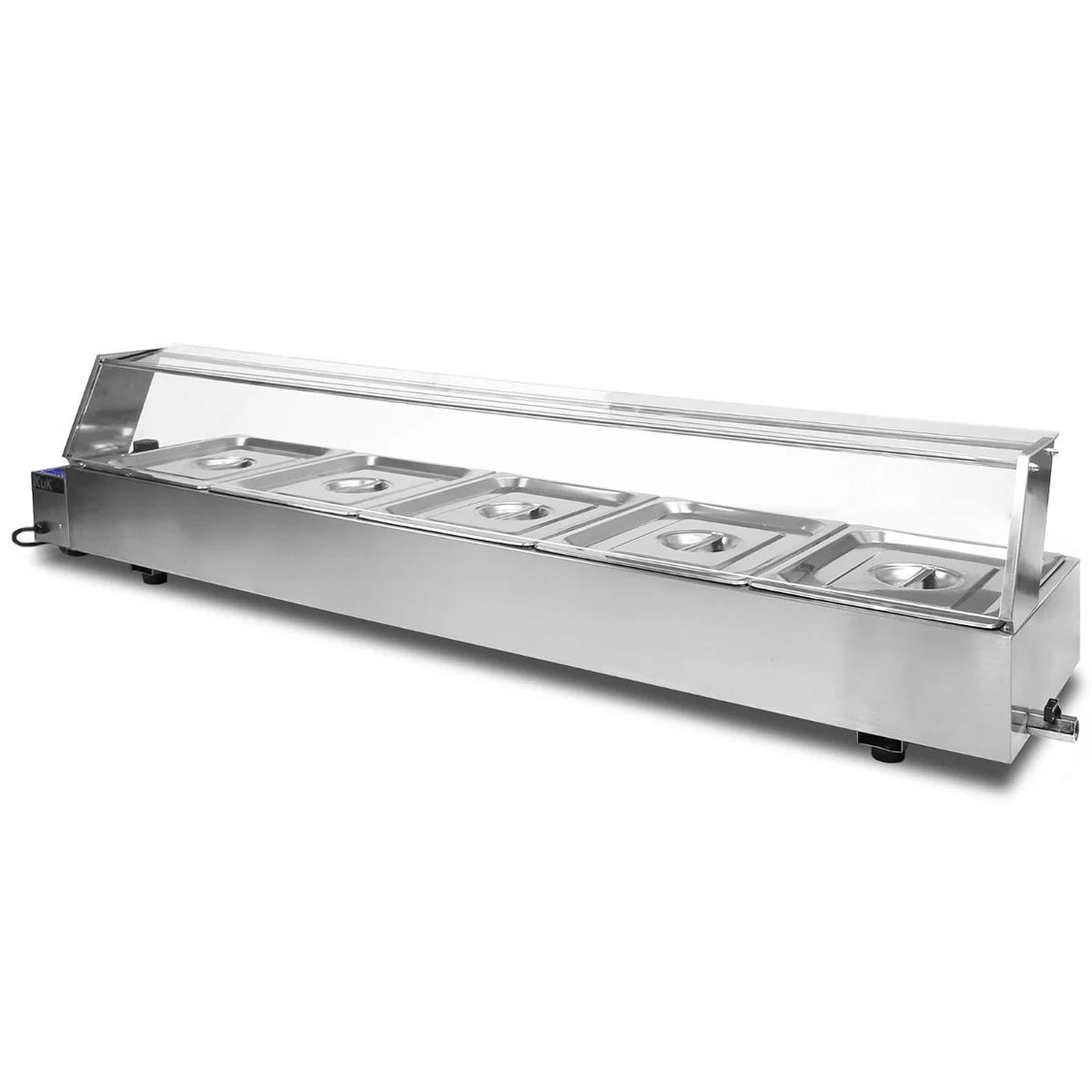
The KuKoo Bain Marie is perfect for keeping food hot at events, restaurants and cafés, which means your guests and customers can taste your delicious hot food the way it should be.
Product Information
KuKoo Pan Bain Marie BM3/BM4/BM5
This is a wet well Bain Marie, so water is required. The simple design means you can begin using immediately. With the temperature range of 30 to 85ºC, food can remain warm whilst also staying safe. You can keep precooked food warm and at a consistent temperature. The included sneeze guard will help to keep your food free from contamination whilst also providing a clear display to entice your customers.
Manufacturer:
Monster Group UK Limited, Monster House
19-23 Alan Farnaby Way,
Industrial Estate Sheriff Hutton,
York
YO60 6PG
Person Responsible:
Rana Harvey, Monster Group UK Limited,
Monster House
19-23 Alan Farnaby Way,
Industrial Estate Sheriff Hutton,
York
YO60 6PG,
England,
+441347878880
EU
Manufacturer:
Monster Group BV,
Van Heemskerckweg 28A & B,
Venlo 5928LL
Netherlands
+441347878880
Person Responsible:
Rana Harvey,
Monster Group BV,
Van Heemskerckweg 28A & B,
Venlo 5928LL,
Netherlands,
+44134787888
Features
1.
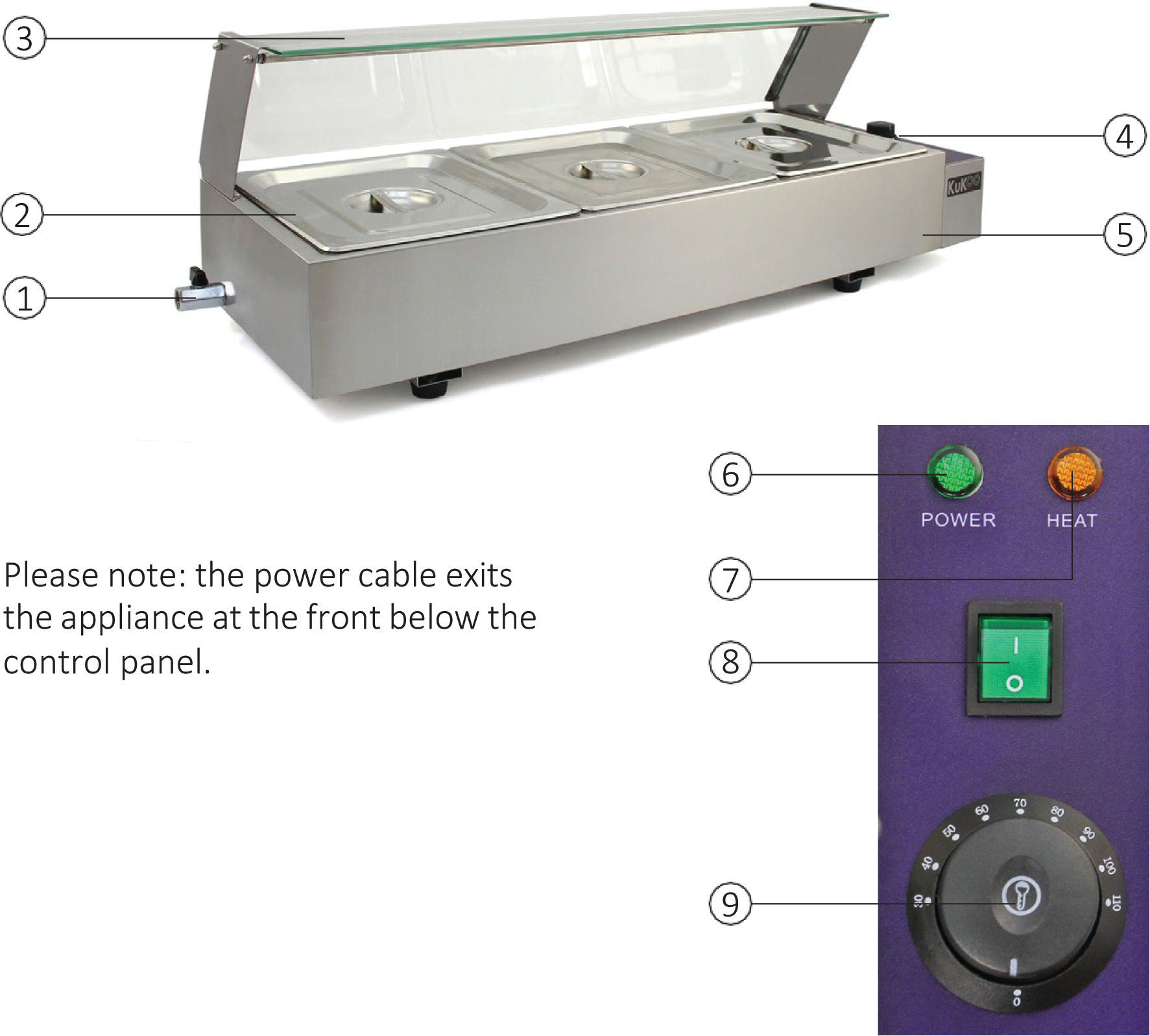
Drain Tap
Stainless Steel Gastronomes & Lids
Sneeze Guard
Control Panel
Water Well
Green Power Indicator
Orange Temperature Indicator
On/Off Switch
Temperature Dial
Assembly
2.
Remove all packaging from the Bain Marie.
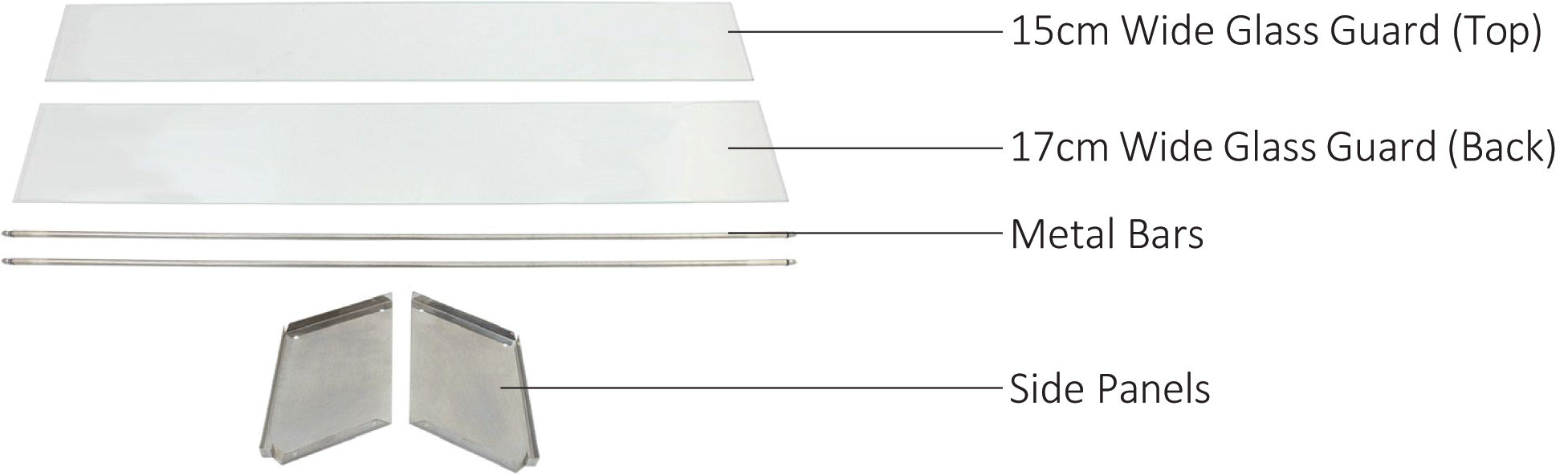
You will need to assemble the sneeze guard. It is very simple and only requires:
2 x Side Panels
1 x 17cm Wide Glass Guard (Back)
1 x 15cm Wide Glass Guard (Top)
4 x Screws
2 x Metal Bars
Using the 4 screws, attach the side panels (2 screws per panel).
Add the first metal bar. To do this, first unscrew the attached nuts. Push the bar into the two holes located towards the back of the side panels. Secure into place using the nuts.
Slide the 17cm wide glass guard into place. It will create the back.
Add the second metal bar, with the same technique, but locating at the front of the side panels.
Slide the 15cm wide glass guard sheet into place. This will create the top.
Operating
3.
Ensure the drain tap is closed. Fill the water well with water. Fill approximately 1/2 of the way up. Ensure the water covers the element, and the bottom 25mm of the pans when they are in place. Please Note: Do not fill water to the top. Do not switch on without water in the well.
Plug the machine into a compatible mains power socket. Turn the machine on via the On/Off power switch and the green indicator light will turn on.
Twist the temperature dial clockwise to the required temperature. The orange indicator light will turn on to show that the bain marie is beginning to heat up.
When the bain marie has reached the temperature set by the temperature dial, the orange indicator light willswitch off. This light will turn on and off whilst the bain marie is switched on, as the thermostat maintains an even temperature on your food.
Now that the bain marie has reached temperature you can add your pre-cooked food into the stainless steel gastronomes. This appliance should not be used for cooking food; it can only be used for heating and maintaining food temperature.
The lids can be placed on top of the gastronomes to help keep the food warm, be sure to use heat proof gloves when removing the lids or gastronomes.
When you have finished using the bain marie, turn the temperature dial to 0 and flick the On/Off switch to the off position. Be sure to use heat proof gloves when removing the gastronomes from the bain marie.
Allow the water and element to cool. Drain the water using the tap on the side.
Maintenance
4.
Do not operate the device in areas of high temperature or humidity as the machine may not function correctly.
Please give the bain marie a deep clean once every two weeks to keep it in excellent condition. When cleaning it be sure to turn off the machine and disconnect the power cable.
Use a none abrasive damp cloth with a sterilising cleaning agent to ensure that the product is cleaned to food hygiene standards.
After cleaning, allow the gastronomes and lids to dry completely before returning to the bain marie.
Troubleshooting
5. Resolution Guide
Please read through the guide below if you have any issues or faults with your device. The information covers and resolvesthe majority of frequently asked questions.
Q: The bain marie is switched on at the power source but the indicator lights are not turning on.
A: Check the fuse, if it has blown verify that the voltage of the power input is the same as required for this bain marie. If this isn’t the case, then the thermostat may have stopped registering what temperature the machine is at. In this case you will need to contact our Customer Support team via the details on the Contact page.
Q: The bain marie is switched on and the indicator lights are working but the appliance is not heating up.
A: Before switching on, check the bain marie has water in the well. The food temperature may be too high for the appliance or the amount of food is too much for the machine. Remove the food until it cools down or reduce the amount of food in the containers. If this doesn’t resolve the problem there may be a fault with the element, customers still within their warranty can gain a replacement from our Customer Support team via the details on the Contact page.
Q: The indicator lights are constantly flickering red and green.
A: The orange indicator light will turn on and off as the thermostat regulates the temperature of the bain marie. But if either of the lights are flickering or blinking the sensor wiring may be poorly connected, damaged or tangled with other cables. Turn off the machine at the main power source, unplug the power cable and remove the gastronomes. Wait until the element and wires are cool then untangle or tighten the connections. If they are damaged or the issue continues contact our Customer Support team via the details on the contact page.
Q: The element is hissing and won’t keep my food warm.
A: Ensure the element is covered with water, if the problem continues contact our Support team via the details on the Contact page.
For all other issues please contact our Customer Support team via the details on the Contact page.
Previous stepCopy link to sharePrint / PDFNext step
 monstershop.co.uk